
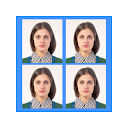
ID Photo application
Advertisement
Advertisement
About this app


Editor Reviews
Skipping the photo booth is the appeal of ID Photo application by siranet. It turns ordinary smartphone pictures into passport-style ID photo files, laid out so they can be printed on standard photo paper at home or at a print shop.
The workflow is practical. Take a photo, or retake it as often as needed, which the developer notes is especially helpful with children who will not sit still. The app then crops it to your chosen ID size and places it on a 4x6 print layout (101.6 x 152.4 mm), saved as an ordinary JPEG so any photo printer that handles phone pictures can output it. Preset sizes include 2 x 2 inches, 1 x 1 inch, 45 x 35 mm, 50 x 35 mm, 48 x 33 mm, 35 x 25 mm, 45 x 45 mm and 40 x 30 mm, and custom dimensions can be typed in. You decide how many copies fit on one sheet, can mix different sizes on the same print, can change the overall print size from the default, and can convert a color shot to black and white. Individual photo files can be saved as well.
Users rate it very highly: 4.8 from about 167,000 ratings, with 92% five stars and 3% one star. It has passed 10,000,000+ installs. The app is free with ads and one in-app purchase at R$49.80 per item. It was updated on 2026-09-03, requires Android 7.0 or newer, and is rated All ages. We list one version, 1.2.02.
Anyone who needs ID photos for documents and has access to a photo printer will save time and money. Check the exact size rules of the office you are applying to first.
Features
- Photography appA Photography app published by siranet.
- 10,000,000+ installsGoogle Play reports 10,000,000+ installs, a reliable sign of an active user base.
- 35.2 MB downloadThe current XAPK weighs 35.2 MB, so plan for that much free space plus room for updates.
- Android 7.0+Runs on Android 7.0 or newer.
- Rated All agesContent rating All ages on Google Play.
Pros
- Many preset sizesEight common ID sizes are built in, and custom dimensions are allowed.
- Print-ready layoutsMultiple photos, even of different sizes, fit onto one 4x6 JPEG print.
- Excellent ratingsIt averages 4.8, with 92% five-star ratings.
Cons
- Ad supportedThe free app carries ads.
- Printing needed separatelyYou still need a photo printer or print service to get physical copies.
Rating distribution
Previous APK Versions All 1 ›
Frequently asked questions
01 Is ID Photo application free?
Yes. ID Photo application is listed as free on Google Play; it also shows ads.
02 Which Android version does ID Photo application need?
The current release requires Android 7.0.
03 How do I install the APK?
Download the file from the version page, open it on your Android device and allow installs from this source when prompted. XAPK bundles need the APKPure app or a split-APK installer (see the install guide in the footer). Always prefer the latest version unless you specifically need an older build.
04 Is the download safe?
Files come from our download library or external sources and are not modified by us. Check the package name (jp.gr.java_conf.siranet.idphoto) and developer before installing.
05 How do I get my account back?
Accounts belong to the developer's own service, not to this site. Use the sign-in recovery option inside ID Photo application, or contact siranet through the support address listed on Google Play.
06 How do I cancel a subscription?
Subscriptions bought through Google Play are managed in the Play Store under Payments and subscriptions; purchases made inside the app follow the developer's own billing.
07 Can I get a refund?
Appmello never charges for downloads, so there is nothing to refund here. Refunds for in-app purchases are handled by Google Play or by the developer. Never enter payment details on any page claiming to be a download step.
08 How do I use ID Photo application?
Open the app after installing; it works exactly like the Play Store build. For feature questions see the developer's help pages, as Appmello only distributes the installer.
Related Apps
 FaceApp: Perfect Face EditorPhotography4.6 ★
 Peachy: Face App & Body EditorPhotography4.6 ★
 Time Warp Scan - Face ScannerPhotography4.1 ★
 Time Warp Scan Cam&Face FilterPhotography4.4 ★
 Toonapp: Cartoon Photo EditorPhotography4.5 ★
 Future Baby Generator, AI BabyPhotography4.4 ★
 Video Editor & Maker - InShotPhotography4.7 ★
 AI Video - AI Video GeneratorPhotography4.6 ★