

AI Video - AI Video Generator
Advertisement
Advertisement
About this app


Editor Reviews
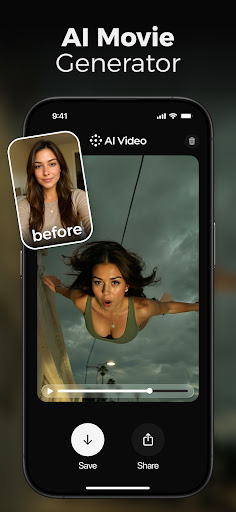
Short-form video creators are the target of AI Video - AI Video Generator, a Photography app from HubX that turns written ideas or still pictures into moving clips. The pitch is simple: describe something, or supply a photo, and let the software produce a shareable video for platforms like TikTok, Instagram Reels and YouTube Shorts.
There are two main starting points. With text-to-video, a user types a scene description, a script or a rough idea, and the app generates footage with motion and visuals to match. With photo-to-video, a single uploaded image, such as a portrait, is animated into a clip. The listing also mentions scene generation for storytelling and a reel maker tuned for short vertical content. Under the hood, the developer says it relies on third-party models such as Google Veo 3.1, Kling, Seedance, PixVerse and Hailuo, and states it is not affiliated with those providers.
The numbers are impressive. It averages 4.6 across roughly 783,000 ratings, with 80% five stars and just 5% one star, and it has 10,000,000+ installs. There are no ads, but in-app purchases cost between $2.99 and $69.99 per item, which is where generation access is likely to be paid for. It was updated on 2026-09-09, needs Android 12 or newer, and is rated Teen. We list 5 versions, the latest being 2.9.1.
Marketers and social posters who want quick clips without editing software are well served. Owners of older phones below Android 12 cannot install it at all.
Features
- Photography appA Photography app published by HubX.
- 10,000,000+ installsGoogle Play reports 10,000,000+ installs, a reliable sign of an active user base.
- 333.22 MB downloadThe current XAPK weighs 333.22 MB, so plan for that much free space plus room for updates.
- Optional in-app purchasesFree to install; in-app purchases ($2.99 - $69.99 per item) are optional.
- Android 12+Runs on Android 12 or newer.
Pros
- Text or photo inputVideos can be generated from a written prompt or by animating a single image.
- Very well rated80% of about 783,000 ratings are five stars, for a 4.6 average.
- Ad-freeThe record lists no advertising in the app.
Cons
- Needs Android 12Phones running anything older than Android 12 are not supported.
- Paid extrasIn-app purchases range from $2.99 to $69.99 per item.
Rating distribution
Previous APK Versions All 1 ›
Frequently asked questions
01 Is AI Video - AI Video Generator free?
Yes. AI Video - AI Video Generator is listed as free on Google Play and offers in-app purchases ($2.99 - $69.99 per item).
02 Which Android version does AI Video - AI Video Generator need?
The current release requires Android 12.
03 How do I install the APK?
Download the file from the version page, open it on your Android device and allow installs from this source when prompted. XAPK bundles need the APKPure app or a split-APK installer (see the install guide in the footer). Always prefer the latest version unless you specifically need an older build.
04 Is the download safe?
Files come from our download library or external sources and are not modified by us. Check the package name (ai.video.generator) and developer before installing.
05 How do I get my account back?
Accounts belong to the developer's own service, not to this site. Use the sign-in recovery option inside AI Video - AI Video Generator, or contact HubX through the support address listed on Google Play.
06 How do I cancel a subscription?
Subscriptions bought through Google Play are managed in the Play Store under Payments and subscriptions; purchases made inside the app follow the developer's own billing.
07 Can I get a refund?
Appmello never charges for downloads, so there is nothing to refund here. Refunds for in-app purchases are handled by Google Play or by the developer. Never enter payment details on any page claiming to be a download step.
08 How do I use AI Video - AI Video Generator?
Open the app after installing; it works exactly like the Play Store build. For feature questions see the developer's help pages, as Appmello only distributes the installer.
Related Apps
 FaceApp: Perfect Face EditorPhotography4.6 ★
 Peachy: Face App & Body EditorPhotography4.6 ★
 Time Warp Scan - Face ScannerPhotography4.1 ★
 Time Warp Scan Cam&Face FilterPhotography4.4 ★
 Toonapp: Cartoon Photo EditorPhotography4.5 ★
 Future Baby Generator, AI BabyPhotography4.4 ★
 Video Editor & Maker - InShotPhotography4.7 ★
 AI Mirror: AI Photo & VideoPhotography4.2 ★