
Monster DIY: Mix Beats
Advertisement
Advertisement
About this app




Editor Reviews
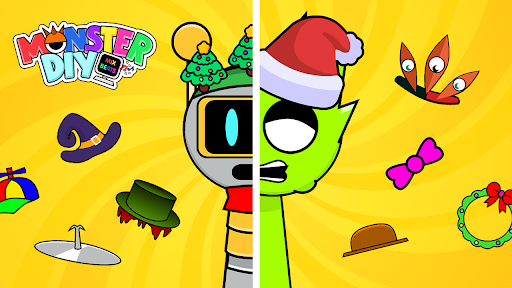
Part character creator, part beat maker, Monster DIY: Mix Beats from HIGAME GLOBAL is a music game where every sound comes with a quirky creature attached. Players assemble monsters from parts and then combine their sounds into a looping track.
Creation starts with the monster itself, built by choosing features such as eyes, mouths and hats. Each creation is tied to a sound, and the selection leans toward odd and slightly spooky noises. Dragging sounds into place builds up a mix, and the monsters dance along to whatever beat results. The listing describes a large collection of monsters to combine, simple drag-and-drop controls, and the option to share finished beats with friends. There are no levels or scores mentioned; the point is to experiment and see what combinations sound good.
On Google Play it holds a 4.5 average from about 31,000 ratings, with 81% five stars and 10% one star, and it has 5,000,000+ installs. The app is free, shows ads and has no in-app purchases. It was last updated on 2025-10-14, needs Android 7.1 or newer and is rated Teen. We list 13 versions, with the latest at 127.6 MB.
Players who enjoy creative toys and making music without any musical training will find it an easy sandbox. Those wanting structured challenges, or a proper music production tool, will find it too simple. Because there are no in-app purchases, every monster and sound is available without spending anything, which makes it an easy app for younger players to explore on their own.
Features
- Music gameA Music game published by HIGAME GLOBAL.
- 5,000,000+ installsGoogle Play reports 5,000,000+ installs, a reliable sign of an active user base.
- 127.6 MB downloadThe current XAPK weighs 127.6 MB, so plan for that much free space plus room for updates.
- Android 7.1+Runs on Android 7.1 or newer.
- Rated TeenContent rating Teen on Google Play.
Pros
- Easy music makingDrag-and-drop controls let anyone build a beat without training.
- Monster customisationEyes, mouths, hats and other parts make each creature unique.
- No in-app purchasesThe game does not sell items, so all content is included.
Cons
- Ad supportedThe free game relies on advertising.
- Few structured goalsThe description names no levels or challenges beyond free experimentation.
Rating distribution
Previous APK Versions All 13 ›
XAPK · 127.6 MB2025-10-14 Monster DIY: Mix Beats 0.1.4
XAPK · 127.7 MB2025-10-10 Monster DIY: Mix Beats 0.1.2
XAPK · 83.6 MB2025-10-09 Monster DIY: Mix Beats 0.1.1
XAPK · 83.6 MB2025-09-27 Monster DIY: Mix Beats 0.1.0
XAPK · 83.3 MB2025-06-15 Monster DIY: Mix Beats 0.0.9
XAPK · 88.1 MB2025-03-22 Monster DIY: Mix Beats 0.0.8
XAPK · 88.4 MB2025-02-07 Monster DIY: Mix Beats 0.0.7
XAPK · 82.3 MB2025-01-29 Monster DIY: Mix Beats 0.0.6
XAPK · 81.5 MB2024-12-27 Monster DIY: Mix Beats 0.0.5
XAPK · 87.6 MB2024-12-20
Frequently asked questions
01 Is Monster DIY: Mix Beats free?
Yes. Monster DIY: Mix Beats is listed as free on Google Play; it also shows ads.
02 Which Android version does Monster DIY: Mix Beats need?
The current release requires Android 7.1. If your device is older, one of the 13 earlier versions listed above may still install.
03 How do I install the APK?
Download the file from the version page, open it on your Android device and allow installs from this source when prompted. XAPK bundles need the APKPure app or a split-APK installer (see the install guide in the footer). Always prefer the latest version unless you specifically need an older build.
04 Is the download safe?
Files come from our download library or external sources and are not modified by us. Check the package name (com.monster.fun.music.mix.sound.beat) and developer before installing.
05 How do I get my account back?
Accounts belong to the developer's own service, not to this site. Use the sign-in recovery option inside Monster DIY: Mix Beats, or contact HIGAME GLOBAL through the support address listed on Google Play.
06 How do I cancel a subscription?
Subscriptions bought through Google Play are managed in the Play Store under Payments and subscriptions; purchases made inside the app follow the developer's own billing.
07 Can I get a refund?
Appmello never charges for downloads, so there is nothing to refund here. Refunds for in-app purchases are handled by Google Play or by the developer. Never enter payment details on any page claiming to be a download step.
08 How do I use Monster DIY: Mix Beats?
Open the app after installing; it works exactly like the Play Store build. For feature questions see the developer's help pages, as Appmello only distributes the installer.
Related Apps
 Magic Tiles 3™ - Piano GameGame Music4.6 ★
 Tiles Hop Music & Ball GameGame Music4.3 ★
 IncrediboxGame Music4.9 ★
 Sprunki Beat: Full Mod MusicGame Music4.5 ★
 Kpop Piano Star - Music GameGame Music4.7 ★
 Sprunki Funky BeatGame Music4.7 ★
 Piano Pop 2: Tiles Music GamesGame Music4.7 ★
 Friday Night Funkin'Game Music4.8 ★