
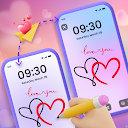
Lockscreen Drawing
Advertisement
Advertisement
About this app


Editor Reviews
Lockscreen Drawing, from EZTech Apps, turns the lock screen into a shared sketchpad. Instead of sending a message, you draw something, and it appears on a connected friend's or partner's lock screen almost immediately.
Doodles can be made on the lock screen, through a home screen widget or inside the app's own canvas. Once friends are linked, which works through QR codes, links or invite codes, their strokes show up on your screen live, so two people can draw together. The widget displays the latest drawings from friends. For decoration there are over 20 themed backgrounds, gallery photos as backdrops and more than 100 stickers. Finished doodles can be saved or shared, and the developer pitches it especially at couples who want to leave little surprise messages for each other.
The rating is 3.9 from about 4,800 votes, with 67% five-star but 20% one-star. It has 1,000,000+ installs. The app is free with ads, and in-app purchases run from $7.99 to $39.99 per item. The last update was on 2025-02-25, which is quite a while ago, it needs Android 7.0 or later and is rated Everyone. We list 11 versions; the latest, 1.1.2, is a compact 15.6 MB.
Couples and close friends who like playful, visual messaging are the obvious audience. Anyone bothered by a long update gap or higher-priced extras may want to weigh those points first. It is a niche idea, but it does that one thing clearly.
Features
- Personalization appA Personalization app published by EZTech Apps.
- 1,000,000+ installsGoogle Play reports 1,000,000+ installs, a reliable sign of an active user base.
- 15.6 MB downloadThe current XAPK weighs 15.6 MB, so plan for that much free space plus room for updates.
- Optional in-app purchasesFree to install; in-app purchases ($7.99 - $39.99 per item) are optional.
- Android 7.0+Runs on Android 7.0 or newer.
Pros
- Live shared drawingFriends see each other's strokes appear in real time.
- Small downloadVersion 1.1.2 is only 15.6 MB.
- Plenty of decoration20+ backgrounds and 100+ stickers are included.
Cons
- Stale updatesThe record shows no update since 2025-02-25.
- Polarised ratings20% of ratings are one star.
Rating distribution
Previous APK Versions All 10 ›
XAPK · 15.6 MB2025-02-26 Lockscreen Drawing 1.1.1
XAPK · 15.6 MB2025-02-06 Lockscreen Drawing 1.1.0
XAPK · 15.3 MB2025-01-21 Lockscreen Drawing 1.0.9
XAPK · 10.1 MB2024-11-15 Lockscreen Drawing 1.0.8
XAPK · 12.7 MB2024-10-12 Lockscreen Drawing 1.0.7
XAPK · 9.1 MB2024-09-14 Lockscreen Drawing 1.0.6
XAPK · 9.1 MB2024-09-09 Lockscreen Drawing 1.0.5
XAPK · 9.1 MB2024-09-06 Lockscreen Drawing 1.0.4
XAPK · 8.6 MB2024-08-16 Lockscreen Drawing 1.0.3
XAPK · 11.8 MB2024-07-31
Frequently asked questions
01 Is Lockscreen Drawing free?
Yes. Lockscreen Drawing is listed as free on Google Play and offers in-app purchases ($7.99 - $39.99 per item); it also shows ads.
02 Which Android version does Lockscreen Drawing need?
The current release requires Android 7.0. If your device is older, one of the 10 earlier versions listed above may still install.
03 How do I install the APK?
Download the file from the version page, open it on your Android device and allow installs from this source when prompted. XAPK bundles need the APKPure app or a split-APK installer (see the install guide in the footer). Always prefer the latest version unless you specifically need an older build.
04 Is the download safe?
Files come from our download library or external sources and are not modified by us. Check the package name (com.ezt.lockscreen.draw) and developer before installing.
05 How do I get my account back?
Accounts belong to the developer's own service, not to this site. Use the sign-in recovery option inside Lockscreen Drawing, or contact EZTech Apps through the support address listed on Google Play.
06 How do I cancel a subscription?
Subscriptions bought through Google Play are managed in the Play Store under Payments and subscriptions; purchases made inside the app follow the developer's own billing.
07 Can I get a refund?
Appmello never charges for downloads, so there is nothing to refund here. Refunds for in-app purchases are handled by Google Play or by the developer. Never enter payment details on any page claiming to be a download step.
08 How do I use Lockscreen Drawing?
Open the app after installing; it works exactly like the Play Store build. For feature questions see the developer's help pages, as Appmello only distributes the installer.
Related Apps
 Clothes Skins For RobloxPersonalization4.4 ★
 GRUBL™ 4D Live Wallpapers + AIPersonalization4.6 ★
 Walli - Stunning 4K WallpapersPersonalization4.5 ★
 Live Wallpapers HD 4KPersonalization4.4 ★
 3D Live Wallpapers 4D video 4KPersonalization4.5 ★
 Wallpapers HD - Backgrounds 4KPersonalization4.7 ★
 Girly WallpapersPersonalization4.3 ★
 iThemes - Easy Widgets, IconsPersonalization4.8 ★